Process documents with Sphinx-Needs

Documenting processes is often a separate task in companies: done by an extra team for processes, methods and tools (PMT), and published in formats that project documentation can’t reuse or reference. But being able to link project requirements to process steps would help developers understand why such requirements exist.
This post explains how the docs-as-code approach can be used to document processes and workflows.
Process descriptions are usually not very detailed. They are tool-independent, and it’s the job of a project team to define the tools and break the high-level processes down into tool-specific workflows.
For such a breakdown it makes sense to have the information from every level of the process definition in one documentation, so that everything can be linked and referenced and becomes more project-specific level by level.
Process model
The model used here is a simplified one, used this way in development departments of a German automotive company. It has these elements:
- Workflow: a collection of activities that must be performed in a specific order to get the needed result.
- Activity: an atomic task description that can be used in different workflows.
- Artifact: a resource that activities use as input or produce as output.
- Storage: the location where a resource can be accessed or must be stored.
And there are relationships between these elements:
- A workflow
- has one or more activities,
- can use the same activity multiple times,
- can have multiple storages,
- needs the artifacts defined by its activities.
- An activity
- is used by one or more workflows,
- uses 0–n artifacts as input or output,
- uses workflow-specific or activity-specific storages.
- An artifact
- can be used by 0–n activities,
- is not related to a storage (that’s defined by the workflow or activity).
- A storage
- is defined or used by a workflow or an activity.
Model configuration
Let’s configure Sphinx-Needs to provide these need types:
needs_types = [
    dict(directive="wor", title="Workflow", prefix="W_", color="#FFCC00", style="node"),
    dict(directive="act", title="Activity", prefix="ACT_", color="#BFD8D2", style="node"),
    dict(directive="art", title="Artifact", prefix="ART_", color="#FEDCD2", style="node"),
    dict(directive="sto", title="Storage", prefix="STO_", color="#DF744A", style="node"),
]
I also want to identify the different objects easily, so let’s set a colored border:
needs_global_options = {
    'style': [
        ('yellow_border', 'type == "wor"'),
        ('green_border', 'type == "act"'),
        ('red_border', 'type == "art"'),
        ('blue_border', 'type == "sto"'),
    ]
}
We also want to make sure that every need gets an ID, and that each ID starts with a specific prefix followed by a number:
needs_id_required = True

# Must start with WOR, ACT, ART or STO, followed by "_" and at least 3 digits, e.g. ART_143
needs_id_regex = r'^(WOR|ACT|ART|STO)_[\d]{3,}'
The relationships are defined, so let’s add specific link types as well:
needs_extra_links = [
    {
        # workflow -> activity
        "option": "executes",
        "incoming": "is executed by",
        "outgoing": "executes",
        "style": "#777777",
    },
    {
        # activity -> artifact
        "option": "produces",
        "incoming": "is produced by",
        "outgoing": "produces",
        "style": "#AA0000",
    },
    {
        # activity <- artifact
        "option": "consumes",
        "incoming": "is consumed by",
        "outgoing": "consumes",
        "style": "#00AA00",
        "style_start": "<-",
        "style_end": "-",
    },
    {
        # storage -> artifact
        "option": "stores",
        "incoming": "stored inside",
        "outgoing": "stores",
        "style": "#0000AA",
    },
    {
        # workflow/activity -> storage
        "option": "uses",
        "incoming": "used by",
        "outgoing": "uses",
        "style": "#000000",
    },
]
Model documentation
This configuration lets us describe our model with Sphinx-Needs:
.. wor:: Workflow object
   :id: WOR_001
   :executes: ACT_001
   :tags: post_process

   Defines a collection of activities, which must be performed in a specific order to get the needed result.

.. act:: Activity object
   :id: ACT_001
   :uses: STO_001
   :consumes: ART_001
   :produces: ART_001
   :tags: post_process

   Atomic task description, which can be used in different workflows.

.. art:: Artifact object
   :id: ART_001
   :tags: post_process

   Some resource, which can be used as input for or output by activities.

.. sto:: Storage object
   :id: STO_001
   :tags: post_process
   :stores: ART_001

   The location of a resource where it can be accessed or must be stored.
The original version of this post was built with Sphinx and showed the result live. Here it is as rendered:
WOR_001Defines a collection of activities, which must be performed in a specific order to get the needed result.
ACT_001Atomic task description, which can be used in different workflows.
ART_001Some resource, which can be used as input for or output by activities.
STO_001The location of a resource where it can be accessed or must be stored.
Looks good. Let’s see the graphical representation:
.. needflow::
   :tags: post_process
   :show_link_names: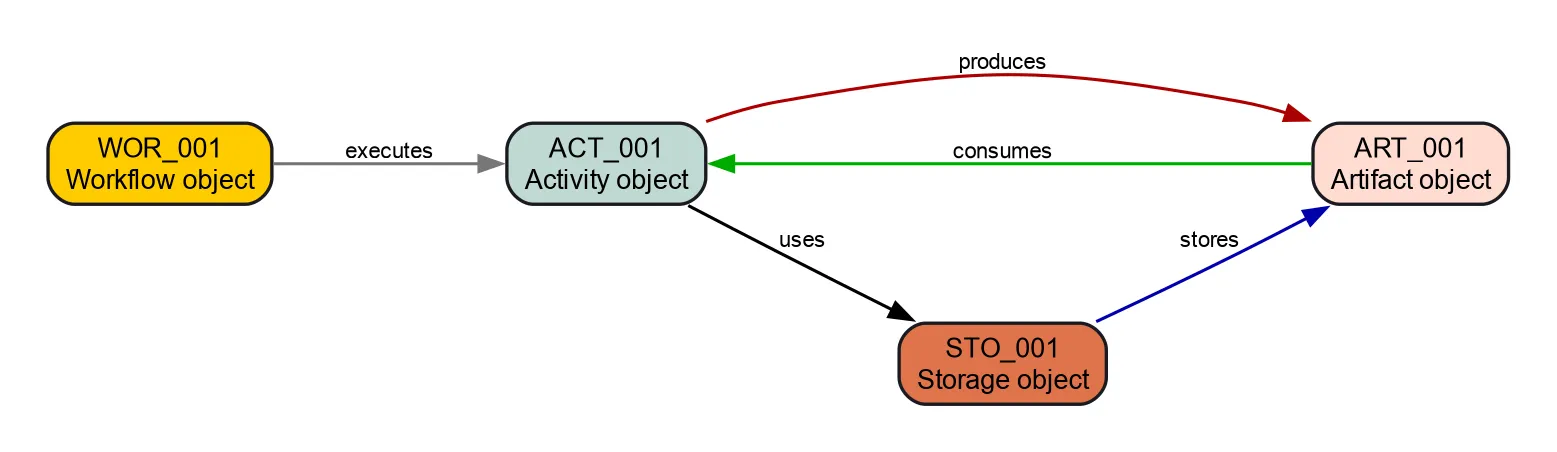
Process hardening
Sphinx-Needs lets you define regular expressions for need IDs and additional link types. But these configurations are not tied to a specific need type. So I could create a need of type workflow, give it the ID ART_123, and use the link type stores.
Let’s use needs_warnings to raise warnings when such internal rules are broken:
needs_warnings = {
    # Check for wrong ID prefixes
    'workflow_with_wrong_prefix': "type == 'wor' and not id.startswith('WOR_')",
    'activity_with_wrong_prefix': "type == 'act' and not id.startswith('ACT_')",
    'artifact_with_wrong_prefix': "type == 'art' and not id.startswith('ART_')",
    'storage_with_wrong_prefix': "type == 'sto' and not id.startswith('STO_')",
    # Check for wrongly used links
    'workflow_with_wrong_link_types': "type == 'wor' and any([produces, consumes, stores, uses])",
    'activity_with_wrong_link_types': "type == 'act' and any([executes, stores])",
    'artifact_with_wrong_link_types': "type == 'art' and any([executes, produces, consumes, stores, uses])",
    'storage_with_wrong_link_types': "type == 'sto' and any([executes, produces, consumes, uses])",
}
A violation of our process rules looks like this on the console:
Checking sphinx-needs warnings
workflow_with_wrong_prefix: passed
workflow_with_wrong_link_types: failed
        failed needs: 1 (WOR_001)
        used filter: type == 'wor' and any([produces, consumes, stores, uses])
WARNING: Sphinx-Needs warnings were raised. See console / log output for details.
If you build with sphinx-build, you can set the option -W. It treats all warnings as errors and stops the build.
So in a CI build, this stops anyone from integrating documentation that doesn’t comply with the process.
A better process model
Of course, this process model is not complete and doesn’t follow any standard.
One important point we haven’t configured is additional options, like a “role” that executes an activity, or an “artifact type” like “document” or “binary”.
Some ideas:
- Additional need types:
- employee: assign people to activities or clarify ownership.
- process and process step: a level above workflows.
- Additional need options:
- duration: time window for executing an activity.
- path/url: location of a storage.
- name: naming scheme for an artifact.
- Additional link types:
- employee: link to an “employee” need.
- department: link to a “department” need.
- tools: links to the tools an activity uses.
As you can see, there is plenty of room for improvement.
Example
The model is configured, so let’s play with it and describe a documentation update and build workflow.
Workflows
This is a small example, so we have only one workflow:
WOR_002Describes how to update our project handbook and what build and deployment look like.
Storages
We need a place for the source files and the final HTML documentation:
STO_002All files for project Y are available at github.company.com/team_x/project_y.
STO_003Stores all HTML documentation.
Artifacts
Our workflow works with these artifacts:
ART_002All data inside /docs/ of the project files.
ART_003The generated, final documentation as HTML pages.
Activities
And finally the activities needed to complete the workflow:
ACT_002Use git to clone the project files.
ACT_003Use the IDE PyCharm to change the files under /docs/.
ACT_004Use git push to upload all commits that include the documentation changes.
ACT_005Builds the documentation and runs some checks on it.
ACT_006Deploys the documentation to STO_003.
Metrics and problems
All numbers, tables and charts below are generated by Sphinx-Needs from the objects above.
The numbers here are for :need:`WOR_002`,
which includes :need_count:`type=="act" and "post_process_example" in tags`
activities and :need_count:`type=="art" and "post_process_example" in tags` artifacts,
stored on :need_count:`type=="sto" and "post_process_example" in tags` storages.
Result: the numbers here are for WOR_002, which includes 5 activities and 2 artifacts, stored in 2 storages.
The overall workflow diagram:
.. needflow::
   :tags: post_process_example
   :show_link_names: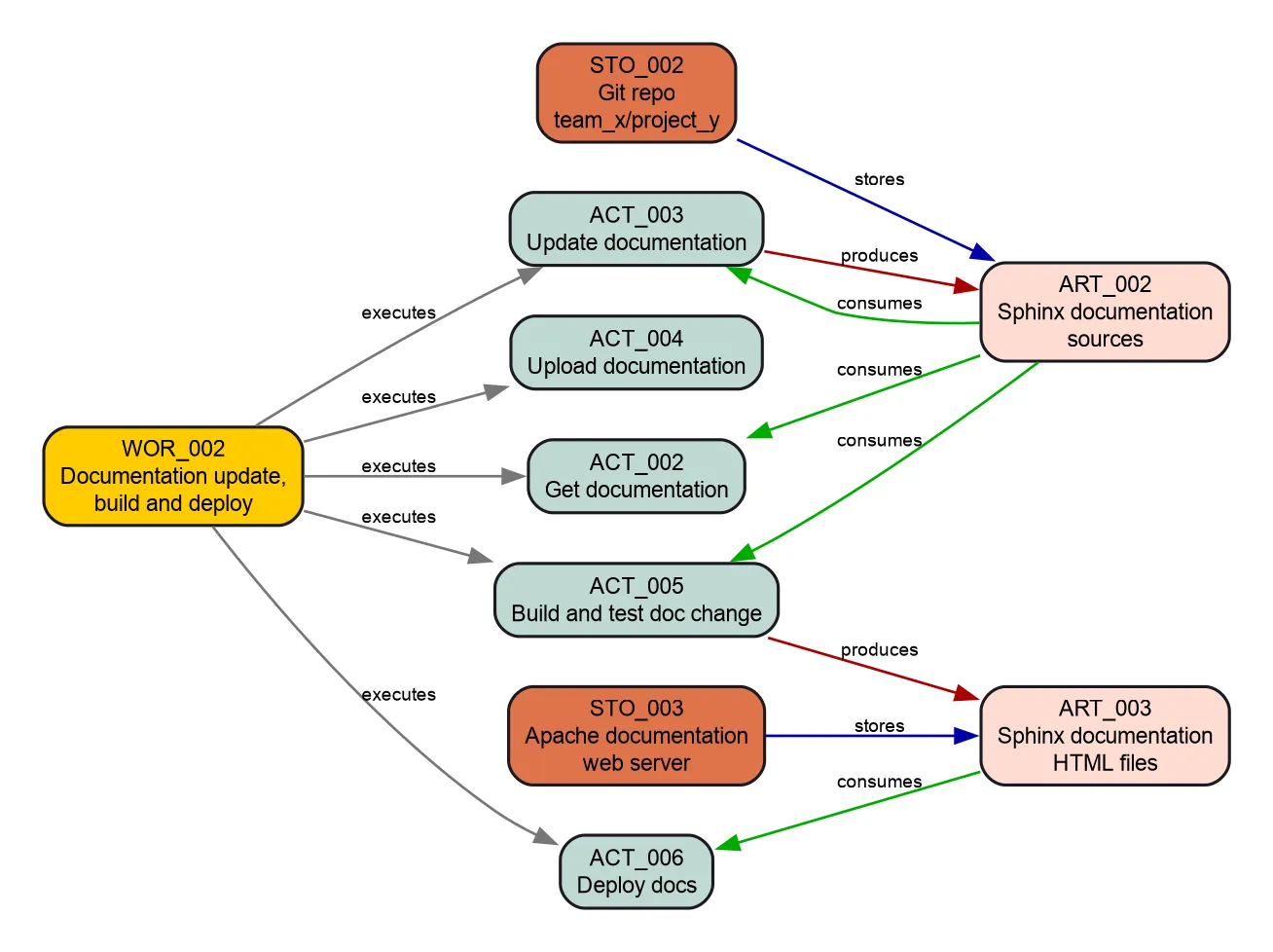
A table with all objects:
.. needtable::
   :tags: post_process_example
:columns: id, title, type_name, role| ID | Title | Type | Role |
|---|---|---|---|
| WOR_002 | Documentation update, build and deploy | Workflow | |
| STO_002 | Git repo github.company.com/team_x/project_y | Storage | |
| STO_003 | Apache documentation web server | Storage | |
| ART_002 | Sphinx documentation sources | Artifact | |
| ART_003 | Sphinx documentation HTML files | Artifact | |
| ACT_002 | Get documentation | Activity | developer |
| ACT_003 | Update documentation | Activity | |
| ACT_004 | Upload documentation | Activity | developer |
| ACT_005 | Build and test doc change | Activity | CI |
| ACT_006 | Deploy docs | Activity | CI |
Metrics
.. needpie:: Comparison of used need types
   :shadow:
   :labels: Workflow, Activity, Artifact, Storage

   type=="wor" and "post_process_example" in tags
   type=="act" and "post_process_example" in tags
   type=="art" and "post_process_example" in tags
type=="sto" and "post_process_example" in tags| Need type | Count |
|---|---|
| Workflow | 1 |
| Activity | 5 |
| Artifact | 2 |
| Storage | 2 |
Overall :need_count:`type=="act" and role=="developer" ? type=="act"` % of activities are done by **developer**.
And :need_count:`type=="act" and role=="CI" ? type=="act"` % by **CI**.
Result: overall, 33.3 % of activities are done by developer, and 33.3 % by CI.
Why isn’t the sum 100 %? See the problems below.
Problems
**Activities** without a set role: :need_count:`type=="act" and not role and "post_process_example" in tags`

.. needtable::
   :filter: type=="act" and not role and "post_process_example" in tags
   :style: table
   :columns: id, title, needs, role
Result: activities without a role: 1
| ID | Title | Needs | Role |
|---|---|---|---|
| ACT_003 | Update documentation | ACT_002 |
Final words
I hope this example and configuration help with your use cases and give you an impression of Sphinx-Needs and its features.
This configuration can easily be extended to document a software development project. Sphinx-Needs supports requirements, specifications and test cases by default – and with the configuration above, you can link software requirements to activities and other process elements.