Prozesse dokumentieren mit Sphinx-Needs

Dieser Beitrag erschien ursprünglich auf Englisch. Zum Original
In vielen Unternehmen ist Prozessdokumentation eine eigene Aufgabe: Ein eigenes Team für Prozesse, Methoden und Tools (PMT) kümmert sich darum und veröffentlicht sie in Formaten, die Projektdokumentation weder wiederverwenden noch referenzieren kann. Dabei würde es Entwicklern helfen, Projektanforderungen mit Prozessschritten zu verlinken – sie würden besser verstehen, warum es eine Anforderung gibt.
Dieser Beitrag zeigt, wie sich Prozesse und Workflows mit dem Docs-as-Code-Ansatz dokumentieren lassen.
Prozessbeschreibungen sind meist nicht sehr detailliert. Sie sind unabhängig von Tools, und es ist Aufgabe des Projektteams, die Tools festzulegen und die übergeordneten Prozesse in toolspezifische Workflows herunterzubrechen.
Dafür ist es sinnvoll, die Informationen aller Ebenen der Prozessdefinition in einer Dokumentation zu haben. Dann lässt sich alles verlinken und referenzieren und wird von Ebene zu Ebene projektspezifischer.
Prozessmodell
Das Modell hier ist vereinfacht; so wird es in Entwicklungsabteilungen eines deutschen Automobilunternehmens genutzt. Es hat diese Elemente:
- Workflow: eine Folge von Aktivitäten, die in bestimmter Reihenfolge ausgeführt werden müssen, um das gewünschte Ergebnis zu erreichen.
- Aktivität: eine atomare Aufgabe, die in verschiedenen Workflows vorkommen kann.
- Artefakt: eine Ressource, die Aktivitäten als Eingabe nutzen oder als Ergebnis erzeugen.
- Ablage: der Ort, an dem eine Ressource liegt oder abgelegt werden muss.
Zwischen den Elementen gibt es Beziehungen:
- Ein Workflow
- hat eine oder mehrere Aktivitäten,
- kann dieselbe Aktivität mehrfach nutzen,
- kann mehrere Ablagen haben,
- braucht die Artefakte, die seine Aktivitäten festlegen.
- Eine Aktivität
- wird von einem oder mehreren Workflows genutzt,
- nutzt 0–n Artefakte als Eingabe oder Ausgabe,
- nutzt Ablagen des Workflows oder eigene.
- Ein Artefakt
- kann von 0–n Aktivitäten genutzt werden,
- hängt nicht an einer Ablage (das legt der Workflow oder die Aktivität fest).
- Eine Ablage
- wird von einem Workflow oder einer Aktivität festgelegt oder genutzt.
Das Modell konfigurieren
Wir konfigurieren Sphinx-Needs mit diesen Need-Typen:
needs_types = [
    dict(directive="wor", title="Workflow", prefix="W_", color="#FFCC00", style="node"),
    dict(directive="act", title="Activity", prefix="ACT_", color="#BFD8D2", style="node"),
    dict(directive="art", title="Artifact", prefix="ART_", color="#FEDCD2", style="node"),
    dict(directive="sto", title="Storage", prefix="STO_", color="#DF744A", style="node"),
]
Die verschiedenen Objekte sollen leicht zu unterscheiden sein, also bekommen sie einen farbigen Rahmen:
needs_global_options = {
    'style': [
        ('yellow_border', 'type == "wor"'),
        ('green_border', 'type == "act"'),
        ('red_border', 'type == "art"'),
        ('blue_border', 'type == "sto"'),
    ]
}
Außerdem soll jedes Need eine ID haben, und jede ID soll mit einem bestimmten Präfix und einer Nummer beginnen:
needs_id_required = True

# Must start with WOR, ACT, ART or STO, followed by "_" and at least 3 digits, e.g. ART_143
needs_id_regex = r'^(WOR|ACT|ART|STO)_[\d]{3,}'
Die Beziehungen sind beschrieben, also legen wir passende Link-Typen an:
needs_extra_links = [
    {
        # workflow -> activity
        "option": "executes",
        "incoming": "is executed by",
        "outgoing": "executes",
        "style": "#777777",
    },
    {
        # activity -> artifact
        "option": "produces",
        "incoming": "is produced by",
        "outgoing": "produces",
        "style": "#AA0000",
    },
    {
        # activity <- artifact
        "option": "consumes",
        "incoming": "is consumed by",
        "outgoing": "consumes",
        "style": "#00AA00",
        "style_start": "<-",
        "style_end": "-",
    },
    {
        # storage -> artifact
        "option": "stores",
        "incoming": "stored inside",
        "outgoing": "stores",
        "style": "#0000AA",
    },
    {
        # workflow/activity -> storage
        "option": "uses",
        "incoming": "used by",
        "outgoing": "uses",
        "style": "#000000",
    },
]
Das Modell dokumentieren
Mit dieser Konfiguration beschreiben wir unser Modell in Sphinx-Needs:
.. wor:: Workflow object
   :id: WOR_001
   :executes: ACT_001
   :tags: post_process

   Defines a collection of activities, which must be performed in a specific order to get the needed result.

.. act:: Activity object
   :id: ACT_001
   :uses: STO_001
   :consumes: ART_001
   :produces: ART_001
   :tags: post_process

   Atomic task description, which can be used in different workflows.

.. art:: Artifact object
   :id: ART_001
   :tags: post_process

   Some resource, which can be used as input for or output by activities.

.. sto:: Storage object
   :id: STO_001
   :tags: post_process
   :stores: ART_001

   The location of a resource where it can be accessed or must be stored.
Die ursprüngliche Fassung dieses Beitrags wurde mit Sphinx gebaut und zeigte das Ergebnis live. So sah es aus:
WOR_001Defines a collection of activities, which must be performed in a specific order to get the needed result.
ACT_001Atomic task description, which can be used in different workflows.
ART_001Some resource, which can be used as input for or output by activities.
STO_001The location of a resource where it can be accessed or must be stored.
Sieht gut aus. Und so sieht es grafisch aus:
.. needflow::
   :tags: post_process
   :show_link_names: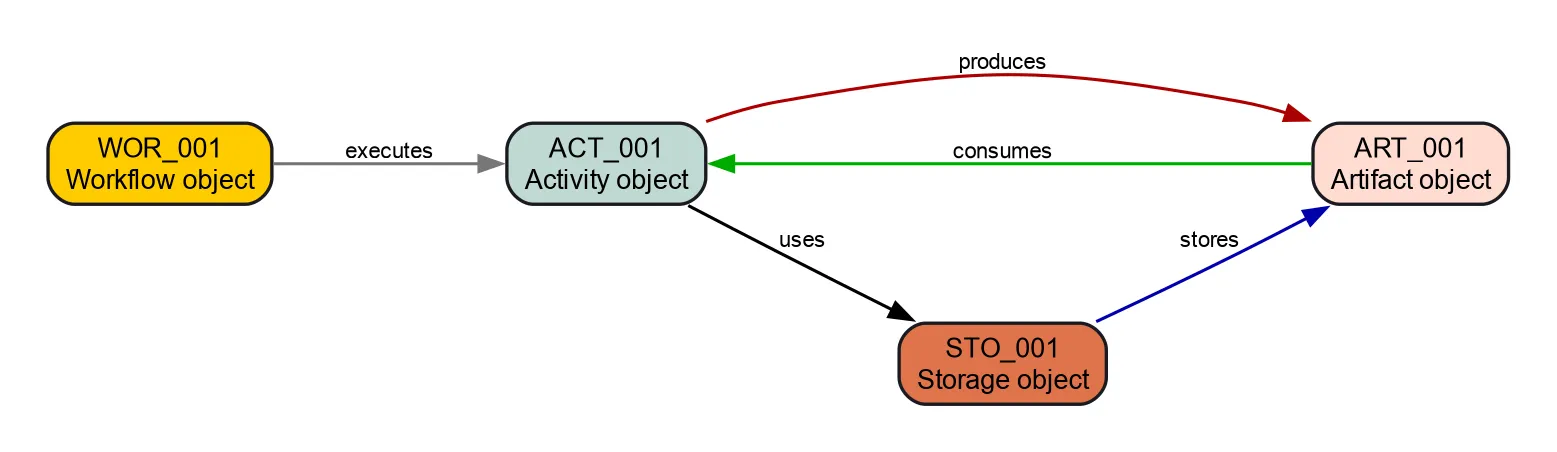
Den Prozess absichern
Sphinx-Needs erlaubt reguläre Ausdrücke für Need-IDs und zusätzliche Link-Typen. Diese Einstellungen gelten aber nicht nur für bestimmte Need-Typen. Ich könnte also ein Need vom Typ Workflow mit der ID ART_123 anlegen und den Link-Typ stores nutzen.
Mit needs_warnings geben wir Warnungen aus, wenn solche internen Regeln verletzt werden:
needs_warnings = {
    # Check for wrong ID prefixes
    'workflow_with_wrong_prefix': "type == 'wor' and not id.startswith('WOR_')",
    'activity_with_wrong_prefix': "type == 'act' and not id.startswith('ACT_')",
    'artifact_with_wrong_prefix': "type == 'art' and not id.startswith('ART_')",
    'storage_with_wrong_prefix': "type == 'sto' and not id.startswith('STO_')",
    # Check for wrongly used links
    'workflow_with_wrong_link_types': "type == 'wor' and any([produces, consumes, stores, uses])",
    'activity_with_wrong_link_types': "type == 'act' and any([executes, stores])",
    'artifact_with_wrong_link_types': "type == 'art' and any([executes, produces, consumes, stores, uses])",
    'storage_with_wrong_link_types': "type == 'sto' and any([executes, produces, consumes, uses])",
}
Ein Verstoß gegen unsere Prozessregeln sieht in der Konsole so aus:
Checking sphinx-needs warnings
workflow_with_wrong_prefix: passed
workflow_with_wrong_link_types: failed
        failed needs: 1 (WOR_001)
        used filter: type == 'wor' and any([produces, consumes, stores, uses])
WARNING: Sphinx-Needs warnings were raised. See console / log output for details.
Baust du mit sphinx-build, kannst du die Option -W setzen. Dann gelten alle Warnungen als Fehler, und der Build bricht ab.
In einem CI-Build verhindert das, dass jemand Dokumentation integriert, die nicht zum Prozess passt.
Ein besseres Prozessmodell
Natürlich ist dieses Modell nicht vollständig und folgt keinem Standard.
Ein wichtiger Punkt fehlt noch: zusätzliche Optionen, etwa eine „Rolle“, die eine Aktivität ausführt, oder ein „Artefakttyp“ wie „Dokument“ oder „Binärdatei“.
Ein paar Ideen:
- Weitere Need-Typen:
- Mitarbeiter: Personen Aktivitäten zuordnen oder Verantwortung klären.
- Prozess und Prozessschritt: eine Ebene über den Workflows.
- Weitere Need-Optionen:
- Dauer: Zeitfenster für eine Aktivität.
- Pfad/URL: Ort einer Ablage.
- Name: Namensschema für ein Artefakt.
- Weitere Link-Typen:
- Mitarbeiter: Link auf ein Need vom Typ „Mitarbeiter“.
- Abteilung: Link auf ein Need vom Typ „Abteilung“.
- Tools: Links auf die Tools, die eine Aktivität nutzt.
Es gibt also viel Luft nach oben.
Beispiel
Das Modell ist konfiguriert, jetzt können wir damit spielen. Wir beschreiben einen Workflow zum Aktualisieren und Bauen der Dokumentation.
Workflows
Ein kleines Beispiel, also nur ein Workflow:
WOR_002Describes how to update our project handbook and what build and deployment look like.
Ablagen
Wir brauchen einen Ort für die Quelldateien und die fertige HTML-Dokumentation:
STO_002All files for project Y are available at github.company.com/team_x/project_y.
STO_003Stores all HTML documentation.
Artefakte
Unser Workflow arbeitet mit diesen Artefakten:
ART_002All data inside /docs/ of the project files.
ART_003The generated, final documentation as HTML pages.
Aktivitäten
Und schließlich die Aktivitäten, die der Workflow braucht:
ACT_002Use git to clone the project files.
ACT_003Use the IDE PyCharm to change the files under /docs/.
ACT_004Use git push to upload all commits that include the documentation changes.
ACT_005Builds the documentation and runs some checks on it.
ACT_006Deploys the documentation to STO_003.
Kennzahlen und Probleme
Alle Zahlen, Tabellen und Diagramme unten erzeugt Sphinx-Needs aus den Objekten oben.
The numbers here are for :need:`WOR_002`,
which includes :need_count:`type=="act" and "post_process_example" in tags`
activities and :need_count:`type=="art" and "post_process_example" in tags` artifacts,
stored on :need_count:`type=="sto" and "post_process_example" in tags` storages.
Ergebnis: Die Zahlen gelten für WOR_002 mit 5 Aktivitäten und 2 Artefakten in 2 Ablagen.
Das Diagramm des gesamten Workflows:
.. needflow::
   :tags: post_process_example
   :show_link_names: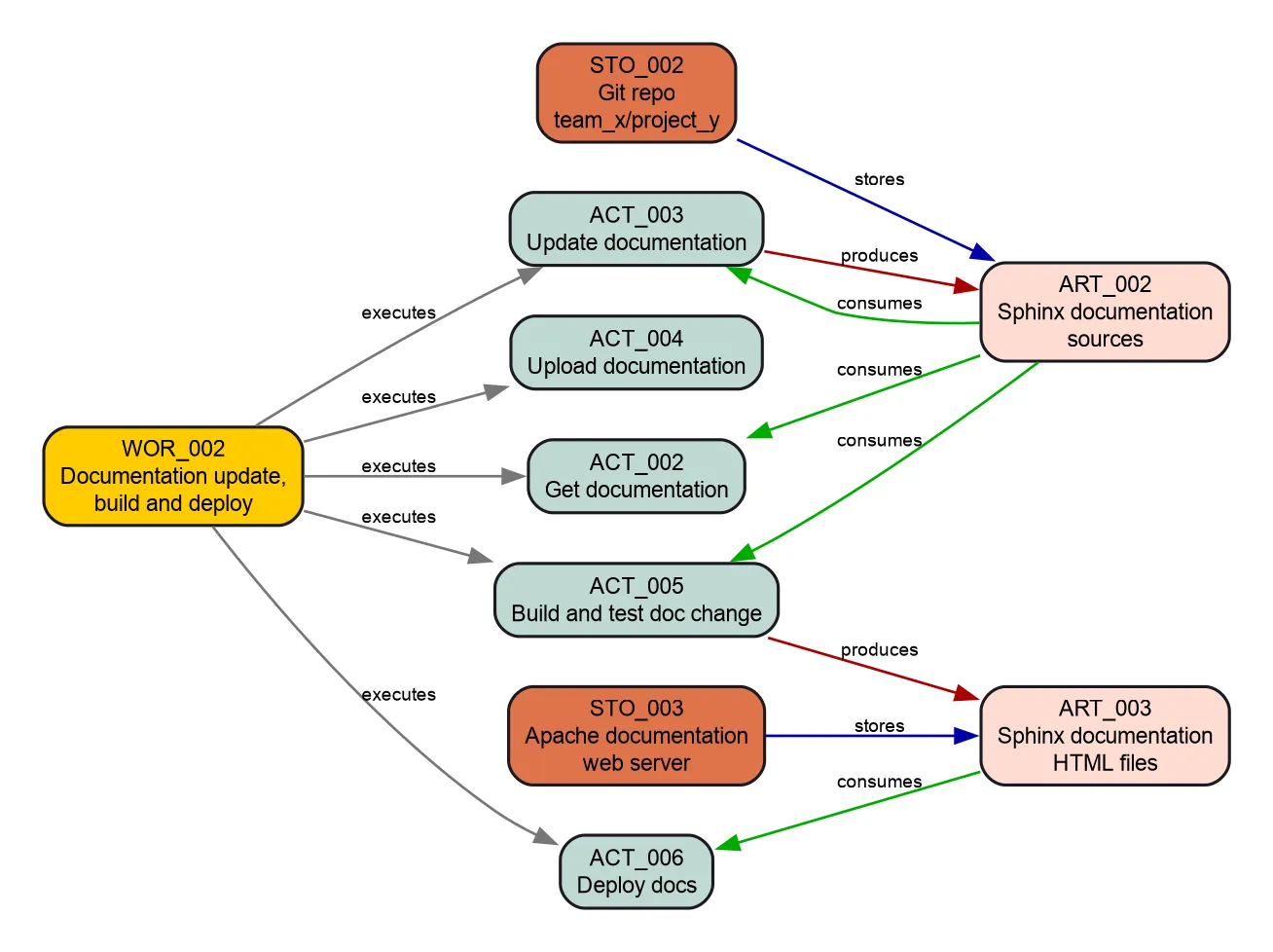
Eine Tabelle mit allen Objekten:
.. needtable::
   :tags: post_process_example
:columns: id, title, type_name, role| ID | Titel | Typ | Rolle |
|---|---|---|---|
| WOR_002 | Documentation update, build and deploy | Workflow | |
| STO_002 | Git repo github.company.com/team_x/project_y | Ablage | |
| STO_003 | Apache documentation web server | Ablage | |
| ART_002 | Sphinx documentation sources | Artefakt | |
| ART_003 | Sphinx documentation HTML files | Artefakt | |
| ACT_002 | Get documentation | Aktivität | developer |
| ACT_003 | Update documentation | Aktivität | |
| ACT_004 | Upload documentation | Aktivität | developer |
| ACT_005 | Build and test doc change | Aktivität | CI |
| ACT_006 | Deploy docs | Aktivität | CI |
Kennzahlen
.. needpie:: Comparison of used need types
   :shadow:
   :labels: Workflow, Activity, Artifact, Storage

   type=="wor" and "post_process_example" in tags
   type=="act" and "post_process_example" in tags
   type=="art" and "post_process_example" in tags
type=="sto" and "post_process_example" in tags| Need-Typ | Anzahl |
|---|---|
| Workflow | 1 |
| Aktivität | 5 |
| Artefakt | 2 |
| Ablage | 2 |
Overall :need_count:`type=="act" and role=="developer" ? type=="act"` % of activities are done by **developer**.
And :need_count:`type=="act" and role=="CI" ? type=="act"` % by **CI**.
Ergebnis: Insgesamt werden 33,3 % der Aktivitäten von developer erledigt und 33,3 % von CI.
Warum ergibt das nicht 100 %? Siehe die Probleme unten.
Probleme
**Activities** without a set role: :need_count:`type=="act" and not role and "post_process_example" in tags`

.. needtable::
   :filter: type=="act" and not role and "post_process_example" in tags
   :style: table
   :columns: id, title, needs, role
Ergebnis: Aktivitäten ohne Rolle: 1
| ID | Titel | Needs | Rolle |
|---|---|---|---|
| ACT_003 | Update documentation | ACT_002 |
Zum Schluss
Ich hoffe, das Beispiel und die Konfiguration helfen dir bei deinen eigenen Anwendungsfällen und geben dir einen Eindruck von Sphinx-Needs und seinen Features.
Die Konfiguration lässt sich leicht erweitern, um ein Softwareentwicklungsprojekt zu dokumentieren. Sphinx-Needs unterstützt von Haus aus Anforderungen, Spezifikationen und Testfälle – und mit der Konfiguration oben kannst du Software-Anforderungen mit Aktivitäten und anderen Prozesselementen verlinken.